-1.svg)
Virtual Staging for Real Estate Photos: How It Works
For most buyers, the search starts online. Listing photos are often the first thing they see — and an important filter for deciding which properties are worth seeing in person.
An empty room may leave its size and potential open to interpretation. An empty room may not give much sense of scale or layout. Outdated furniture can draw attention away from the property itself, while a room under renovation may be difficult to picture when finished.
Virtual staging for real estate photos helps address these challenges by showing how the space could look when furnished.
Furniture and décor are added digitally to an existing property photo, so the room can be shown furnished without physically staging it. The architecture stays the same, while the interior can be presented in a different way.
What Is Virtual Staging for Real Estate Photos?
Virtual staging means digitally furnishing and styling a real estate photo.
Furniture, décor, lighting, curtains, and other non-permanent elements can be added to show how the room might look when furnished. The original property photo remains the base, including its architecture, proportions, windows, floors, and views.
This makes virtual staging different from both physical home staging and ordinary photo editing.
Physical home staging changes the actual property. Furniture and décor are brought into the space before the photographer takes the listing photos.
Photo editing enhances what is already in the image — for example, by correcting exposure, color, perspective, or removing distracting objects.
Virtual staging adds a new visual layer to the photograph. The room itself remains the reference point, while furniture and interior styling are used to demonstrate its potential.
That distinction is important. The purpose of virtual staging is to help buyers understand and imagine a real space — not to make it appear to be a different property.
How Does AI Virtual Staging Work?
Traditional virtual staging is a hands-on editing process. A designer chooses furniture, builds the composition, adjusts scale and perspective, and works with the lighting in the original photograph.
AI automates much of that work. It analyzes the photo and generates furniture and décor within the existing scene.
The process generally involves three stages.
1. Analyze the Room
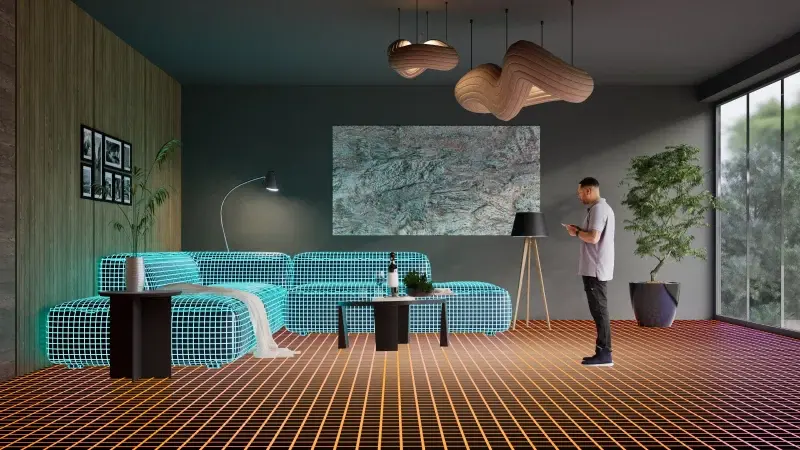
Computer vision analyzes the photograph to understand its spatial structure. It identifies elements such as floors, walls, ceilings, windows, doors, and existing furniture.
These elements provide the reference for the generated interior.
2. Analyze the Lighting
The system evaluates the lighting already present in the image, including its direction, intensity, and shadows.
This information helps the generated furniture fit the lighting conditions of the photograph.
3. Generate the Interior
The user chooses an interior style, and AI adds suitable furniture and décor to the room.
The new elements match the room’s perspective and proportions.
The same photo can be used to try different interior designs without changing the room.
Where Virtual Staging Fits: Common Scenarios
Virtual staging is most useful when the current interior makes a property harder to present.
Outdated Interiors
A room may have good architecture but dated furniture, colors, or décor. Replacing the existing interior digitally lets the listing present a more current furnishing direction without physically refurnishing the property.
Empty Rooms
Vacant rooms are accurate but can be hard to judge. Furniture gives buyers a better reference for scale, layout, and possible use.
Unrenovated or Transitional Spaces
Some rooms are simply not ready for photography. A property may be between occupants, partly furnished, or temporarily used for storage.
Virtual staging can show a considered interior concept without waiting for the physical space to be fully prepared.
The Business Value of Virtual Staging
For real estate teams, the value of virtual staging goes beyond the final image. It can make property presentation more flexible, efficient, and easier to scale.
Reduce Physical Staging Logistics
Physical staging can involve furniture sourcing or rental, delivery, setup, styling, and removal. In the U.S., NAR reported a median cost of $1,500 for a professional staging service in its 2025 Profile of Home Staging. For vacant homes, 2026 estimates from Angi put staging costs at around $4,000–$6,000, depending on the property and scope.
Create Several Concepts From One Photo
Changing a physical furnishing concept means changing the room. With virtual staging, the same property photo can be used to explore different interior directions without another setup or photoshoot.
Avoid Ongoing Physical Inventory
Physical staging may also involve recurring furniture rental while the property is on the market. Digital staging removes that inventory from the equation.
Reuse Visual Content
Staged images can be used across listing pages, presentations, brochures, social media, and advertising. A new furnishing direction can be created without photographing the room again.
Handle More Properties With the Same Workflow
For agencies managing multiple listings, staging can become a repeatable content process rather than a separate physical project for every property.
AI Virtual Staging vs. Manual Virtual Staging vs. Physical Home Staging
There are three common ways to stage a property, and each has its own strengths.
| Criteria | AI Virtual Staging | Manual Virtual Staging | Physical Home Staging |
| Control over the result | Depends on the workflow and user input | High — each element is edited manually |
High — furniture is selected and positioned in the actual room |
| Speed | Minutes to generate an image | Typically 1–3 hours per image, depending on the complexity of the edit |
Typically 1–3 days for furniture delivery, setup, and styling before photography |
| Creating different concepts | Easy — generate multiple versions from the same photo | Possible — each version requires additional manual editing |
Difficult — each new concept requires the room to be physically restaged |
| Physical furniture required | No |
No |
Yes |
| Best suited for | calable property visualization and listing content across multiple rooms and properties | Highly specific, custom, art-directed images | In-person property presentation and viewings |
AI virtual staging is well suited to repeatable visual production. Manual virtual staging offers greater hands-on control for highly specific compositions. Physical staging serves a different purpose: it lets buyers experience the furnished property in person.
The right option depends on the property, the required level of control, and whether the presentation needs to work online, in person, or both.
What Makes Good AI Virtual Staging?
Good AI staging depends on accuracy and precision. The furniture needs to fit the room, not simply look realistic on its own.
- Scale and proportion. Furniture should match the size of the room and relate properly to the other pieces. An oversized sofa can make a large room feel cramped; undersized furniture can make the proportions look distorted.
- Placement. Furniture has to work around doors, windows, circulation paths, focal points, and available floor space. A good arrangement should make sense as a real room.
- Perspective. The generated furniture needs to follow the camera angle and depth of the original photograph. Incorrect perspective is one of the quickest ways to make a staged image look artificial.
- Lighting. The new furniture should respond to the same light as the room. Shadows, highlights, and reflections all have to point in the right direction.
- Materials. Fabric, wood, metal, glass, and stone react differently to light. Realistic material behavior helps furniture sit naturally within the scene.
The difference is often in the details. A staged room can contain perfectly realistic furniture and still look wrong if the furniture is too large, badly positioned, or lit differently from the room.
How to Get Better Virtual Staging Results
A strong source photo gives the AI a much better foundation for understanding the room and generating believable results. For better staging:
- Use balanced lighting. Avoid strong mixed color temperatures where possible.
- Keep the camera level. A straight, stable shot gives the AI a clearer view of the room.
- Avoid extreme wide-angle distortion. It can make walls, furniture, and room proportions look unnatural.
- Show enough of the floor. The staging process needs a clear sense of where furniture sits within the room.
- Use a high-resolution source. Avoid heavy filters and compression before staging.
Zolak’s Approach: Controlled AI Virtual Staging Built for Real Estate
Most AI staging tools start with a single room photo: upload it, choose a style, and generate a result.
Zolak’s AI virtual staging solution takes a broader approach, combining controlled AI virtual staging with a complete property presentation workflow.
Agents can control the room layout and choose the style before generation, then use the resulting visuals alongside property information, original photos, and agent details to create ready-to-use presentation materials.
A Workflow Built for Real Estate
1. Import the Property
Paste the URL of an existing listing or upload the available files. Zolak imports the property information and photo gallery, so there is no need to recreate the content from scratch.
2. Prepare the Room
Choose a working photo for each room. Zolak analyzes its geometry, lighting, and materials, then lets you remove unwanted elements individually or clear the room completely while preserving the architectural details.
3. Stage and Restyle
Choose a design style — Scandinavian, Mediterranean, Modern Luxury, Tuscan, Italian Classic, or Contemporary — and generate the staged interior. You can also relight the same frame with daylight, overcast, or evening conditions.
Each new variant is saved alongside the previous ones, so you can compare different options without losing earlier versions.
4. Build the Presentation
The finished visuals are combined with the property's information and original photos in a ready-to-use PDF. Required details can be prepared in advance, while the final document brings everything together in one presentation.
The result is not just a set of AI-generated images. It is a workflow for taking property content from existing photos to staged visuals and a finished presentation.
Bring Virtual Staging Into Your Property Pages
If your agency has its own website, you can take the staging experience one step further and put it directly on the property page.
A buyer can browse the original photos and property details, then open the staging experience to see how the rooms could look with different furniture and styles — without being sent to another website or separate tool.
Zolak supports both pop-up and inline formats, so the experience can either open over the existing page or sit directly within the listing alongside the rest of the property content.
Responsible Virtual Staging
Virtual staging should show buyers what a space could look like without giving them a false idea of the actual property.
Furniture and décor can be changed digitally, but the underlying property should remain accurate. When an image has been virtually staged or enhanced with AI, it should be identified as such and handled according to the disclosure requirements that apply to the listing.
NAR's Code of Ethics requires realtors to present a true picture in advertising and other representations.
The principle is to show the potential of the space, and be transparent about what has been digitally changed.
See It on Your Own Listings
The fastest way to judge virtual staging is on a real, empty room from your own inventory. Book a demo to see Zolak AI Virtual Staging applied to one of your current listings.
FAQ
What is virtual staging for real estate photos?
How does AI virtual staging work?
Can existing furniture be removed from a photo?
Can one photo be staged in different styles?
Can virtual staging change the layout of a room?
How is AI virtual staging different from an AI room design app?
Does virtual staging increase home sales?
Do virtually staged real estate photos need to be disclosed?
Who can use AI virtual staging?