Updated November 2026
Picturing a sofa in your own living room from a product photo is hard, and augmented reality is one of the most direct answers to that problem. Yet many retailers are still unsure what augmented reality for furniture actually involves and whether it's worth adding to their store.
This guide explains how AR works in furniture ecommerce, how retailers like IKEA, Amazon, and Wayfair use it, how browser-based AR compares with app-based AR, where AR helps the buying decision and where its limits are, what has changed in 2026, and how to launch AR for your own catalog.
What Is Augmented Reality in the Furniture Industry?
Augmented reality is a technology that blends digital content (such as images, videos, or 3D models) with the real world, thereby allowing users to see virtual objects in the real environment. Typically, this is achieved by using camera-equipped devices such as a smartphone, tablet, or headset.
With the rise of e-commerce, many people are now accustomed to browsing and purchasing products online, but there has always been a challenge in visualizing how a particular piece of furniture will look in a real space.
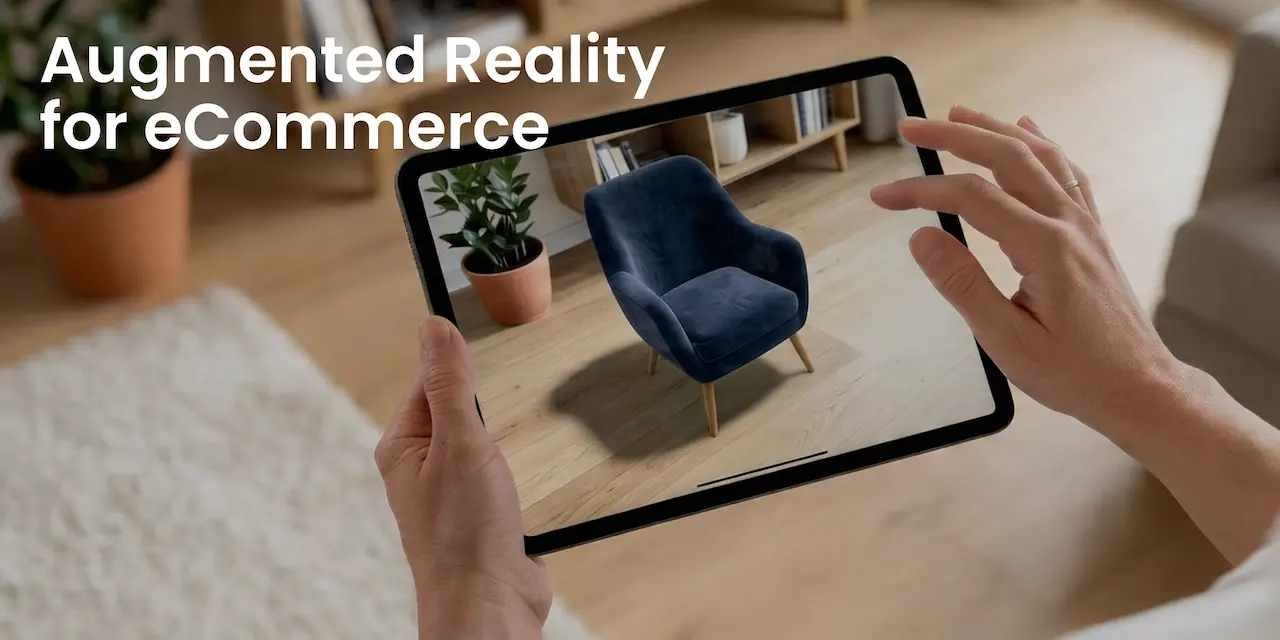
Augmented reality solves this in the shopper's own home. Instead of guessing from photos and a list of dimensions, shoppers open AR from a retailer's app or straight from a product page in the mobile browser and see the product in their own space.
The shopper picks a sofa or a table, points the phone at the floor, and a true-to-scale 3D model of that product appears in the live camera view. They can move and rotate it, walk around it, and check the size, the clearance, and how it looks next to what's already in the room - before they order.
Top Examples of Augmented Reality in the Furniture Industry
Furniture retailers use two kinds of "see it in your room" tools. AR places a 3D product in the live camera view. Room visualization works from a photo or scan of the room and lets shoppers furnish it on screen. Both answer the same question - will this fit and look right? - but they work differently, so the examples below are grouped that way.
AR Furniture Placement: Examples

- IKEA was one of the first furniture retailers to put AR in shoppers' hands with IKEA Place, launched in 2017 on Apple's ARKit. The standalone app has since been retired, and AR now lives on IKEA's own product pages: products with a 3D model get a "View in 3D" button, and desktop shoppers scan a QR code to preview the item in their room on their phone.
- Amazon launched AR View in 2017 for placing a single item in your room. In 2020 it added Room Decorator, which lets shoppers place several furniture and decor items at once and save room layouts to come back to later. In the Amazon Shopping app, eligible products show a "View in Your Room" button, and sellers unlock it by submitting an approved 3D model. On the desktop site, the same model powers "View in 3D," but AR itself stays in the app.
- Wayfair added View in Room 3D to its app in 2017, built on Apple's ARKit and later on Google's ARCore for Android. In the Wayfair app, shoppers tap the button under a product that has a 3D model and place it in their room at full scale. Like Amazon, Wayfair keeps AR in its app rather than on the desktop site.
- Zolak brings the same experience to retailers and manufacturers that don't have their own app. Shoppers tap the AR button in the Zolak 3D Viewer or 3D Configurator on a product page and place the product in their room at real size - in the fabric or finish they picked. AR runs in the mobile browser on ARKit- and ARCore-compatible phones and tablets, so there's nothing to install. On desktop, shoppers scan a QR code to continue on their phone.

Beyond Live AR: Furnishing a Photo or Scan of Your Room
- IKEA Kreativ shows that even IKEA treats these as different jobs. Next to "Preview in AR," the same product page offers "Try in a room," which places the product in ready-made 3D showroom interiors. Kreativ goes a step further: shoppers scan or photograph their own room, erase the existing furniture, and fill the space with IKEA products. It isn't live AR - you can't walk around the furniture - but it's better suited to planning a whole room. AR answers "does this one piece fit?", while showrooms and Kreativ answer "how should this room look?" We compared IKEA Kreativ with Zolak Showroom in a separate review.
- Zolak User Interior Visualization gives retailers a similar "try in your room" experience on their own website. Shoppers upload a photo of their room, Zolak detects the floor and walls to keep products at the correct scale, and shoppers can remove existing objects, then place, move, and configure products from the retailer's catalog. The finished room goes straight to the store's cart. See how it works on our User Interior Visualization page.
Bring the same experience to your product pages. IKEA built AR, 3D showroom interiors, and room planning in-house. Zolak gives furniture retailers and manufacturers the same set on their own site - 3D and AR on the product page, ready-made room scenes, and room design from a shopper's photo - without building an app or a 3D team.

WebAR vs. AppAR
Regarding implementing augmented reality in the furniture industry, there are two main approaches:
- WebAR (browser-based AR) launches from the product page in the mobile browser. Shoppers don't install anything, so AR is available at the moment they're deciding, to anyone with a compatible phone. Retailers don't have to build, publish, or maintain an app. For the core furniture use case - placing one product in a room - browser-launched AR relies on the same frameworks native apps use: ARKit on iOS and ARCore on Android.
- App-based AR runs inside a retailer's own app. It's worth it when you need more than single-item placement: furnishing a whole room, saving layouts to a customer account, or building AR into a larger shopping experience. The trade-offs are reach and cost. Shoppers have to download the app first, a step many skip, and native iOS and Android apps cost far more to build and keep up to date.

For most furniture retailers, AR on product pages in the browser is the practical place to start. An app makes sense if you already have one with a large, active audience.
How Does AR Furniture Technology Work?
There are two common types of augmented reality when it comes to placing furniture:
Marker-based AR anchors digital content to an image the camera recognizes, such as a printed code, a logo, or a catalog page. In furniture retail it's mostly used in print catalogs, on packaging, and in stores: scan a page or a tag to see the product in 3D, get product details, or open assembly instructions. It isn't the usual way to place furniture in a room. A QR code that simply opens an AR view on your phone isn't a marker, by the way - it's just a link.
Markerless AR is what most furniture placement uses. The phone detects the floor and other flat surfaces through its camera and motion sensors, then anchors a true-to-scale 3D model there. Shoppers can move it, rotate it, and walk around it as if it were really in the room.

Markerless AR is accurate enough to check whether a sofa fits a wall or leaves enough walking space, but it has limits. Dim lighting, plain or glossy floors, and fast camera movement make surface detection less reliable. And AR can only be as true to scale as the 3D model behind it, so accurate product dimensions matter as much as the technology.
What Is the Advantage of Augmented Reality in the Furniture Industry?
Furniture is expensive, bulky, and hard to judge from photos, and getting it wrong is costly for both the shopper and the retailer. That's where AR earns its place. Keep in mind that most survey data on AR in retail measures what shoppers say they'd do, not what they actually did, so treat it as a signal of demand rather than a forecast for your store.
- Fewer returns. In the 2023 MAGNA, Reprise and Snap study, 64% of respondents said they'd be less likely to return a product they had experienced virtually before buying. With furniture, every avoided return saves freight, handling, and often a damaged item.
- Fewer size and fit mistakes. Shoppers check for themselves whether a sofa fits the wall, a table leaves enough walking space, or a bed suits the room's proportions - before the order, not on delivery day.
- More confidence in big purchases. The higher the price and the bigger the item, the stronger the doubt. Seeing the product at real size in their own room gives shoppers a concrete reason to stop hesitating.

Benefits of AR in the Furniture Industry
Here's where AR makes the biggest difference along the furniture buying journey.
1. Augmented Reality for Furniture Placement
One of the most difficult aspects of purchasing anything online is imagining what the product will look like in real life.
While returning a shirt is reasonably simple, returning a dining room table that didn't fit is a more complex process. That's why shoppers often hesitate to buy furniture online.
AR lets shoppers "try out" furniture before they buy. They can see how a dining set fits their dining room, whether a sofa leaves enough walking space, and how a color works with the rest of the room. For a closer look at this use case, read why retailers are investing in AR furniture placement.
2. Augmented Reality Furniture Showroom
A physical showroom can only display so much. With AR, every product that has a 3D model can be seen at real size, including pieces that aren't on display, made-to-order items, and fabrics or finishes no store could stock all at once. It also reaches shoppers who don't have the time or the option to visit a store.
3. Engage Customers with AR Furniture Shopping
AR turns passive browsing into hands-on evaluation. Shoppers rotate the product, place it in their room, walk around it, and compare options instead of scrolling past. It also answers the questions they would otherwise send to support, like "will this fit?" or "how big is it really?"
4. Influence Your Customers' Purchase Decisions
Furniture shoppers rarely buy on impulse. They hesitate over size, style, and color, and that hesitation is often where the sale is lost. AR removes much of the guesswork: shoppers see the product in their own room and can judge whether it suits the space and their interior. How much they trust what they see depends on the 3D model, so accurate dimensions and realistic materials matter.
Read our guide to 3D commerce to see how 3D viewers, configurators, and AR work together on a product page.
5. Provide Personalized Experience
Many furniture products come in dozens of fabrics, colors, and finishes, and photographing every combination is rarely realistic. With a 3D furniture configurator, shoppers pick a fabric or finish and then open that exact version in AR, in their own room. Shoppers value this: in a 2020 Accenture Interactive survey of more than 3,000 consumers, 47% said they would pay extra for a product they could customize or personalize using immersive technology.
6. Stand Out with AR Technology in the Furniture Industry
AR used to be something only the largest retailers could afford. IKEA, Amazon, and Wayfair made it familiar to shoppers, and browser-based AR has made it practical for mid-sized retailers and manufacturers too, with no app to build. For a furniture brand today, AR is less about the wow factor and more about giving online shoppers the confidence they'd get in a showroom.
AR for Furniture in 2026: What's Changed
Shoppers already know how to place a sofa in their room with a phone. What has changed in the last two years is where AR shows up, how 3D models get made, and what new devices add.
AR Now Reaches Shoppers Beyond Your Website
A 3D model you create for AR on your product pages can work in other channels too:
- Google Search. Merchants can add glTF/GLB models of home goods to their product data, and eligible products in free listings show a "View in your space" button. It's available for products sold in the US and a few other markets. Google also generates 360° spins from product photos with AI, but those spins don't support AR - only a 3D model supplied by the merchant does.
- Amazon. For eligible products, an approved 3D model enables View in 3D and, where supported, View in Your Room.
- Shopify. Shopify accepts GLB models as product media and shows them in 3D and AR on the product page.
For a furniture retailer, this changes the math: one accurate 3D model per product can now serve your own site and the marketplaces where your products are sold.

AI Makes 3D Models Cheaper, but Not Automatically Accurate
AI tools can now turn one or a few product photos into a 3D model in minutes, often for less than a dollar. That's a real shift for catalogs with thousands of SKUs. But AR placement is only useful if the model's dimensions are right, and a photo doesn't tell the AI how deep a sofa is or how high its seat sits. Before an AI-generated model goes into AR, check its dimensions against the product spec and its materials against the real fabric or finish.
Generative AI is also changing room visualization, from AI-assisted room scanning to restyling a room photo in different interior styles. We look at how AI and AR work together in AI vs augmented reality for furniture retailers.
Headsets Are Still a Showroom Tool
Mixed reality headsets keep improving: Samsung launched Galaxy XR on Google's Android XR platform in October 2025 at $1,799, joining Apple Vision Pro. Both can show furniture at true scale with impressive realism, but very few shoppers own one. For now, headsets make sense as an in-store demo for high-ticket or made-to-order furniture. The phone in your customer's pocket remains the main AR channel.
How to Launch AR for Your Furniture Catalog

- Start with the products shoppers struggle to judge online. Sofas, sectionals, dining tables, beds, and storage: large, expensive items where size and fit drive returns. A pilot on a few dozen best-sellers is enough to learn what works.
- Get accurate 3D models. Build them from CAD files, technical drawings, or photos, and set real-world dimensions for every model. glTF/GLB is the standard format for web 3D, Google, Amazon, and Shopify; Apple's native AR viewer uses USDZ.
- Digitize materials properly. Fabrics, woods, and metals need PBR materials (at minimum color, normal, and roughness maps) so they react to light the way the real finish does. Every fabric or finish you sell should be its own variant.
- Add AR to the product page. Put the AR button in the product gallery, 3D viewer, or configurator, so shoppers open AR in the exact version they picked. Give desktop visitors a QR code to continue on their phone.
- Measure the impact. Track how many product page visitors open 3D and AR, and compare add-to-cart, conversion, and return rates for products with and without AR.

FAQ
Can augmented reality help me check if furniture will fit?
Yes. AR places the product at its real dimensions, so you can check whether it fits a wall, leaves enough walking space, or blocks a door. It's reliable as long as the 3D model's dimensions are correct and the phone has detected the floor well. For large pieces, also measure doorways, stairs, and elevators on the delivery route: AR shows the room, not the way in.
How can retailers let customers see furniture in their room before buying?
There are three main ways: browser-based AR on the product page, AR in the retailer's own app, and room visualization from a photo or scan of the customer's room. Browser AR reaches the most shoppers with the least effort, while photo-based tools are better for planning a whole room.
Do customers need to download an app to use furniture AR?
Not with browser-based AR. It opens from the product page on phones and tablets that support ARKit (iPhone, iPad) or ARCore (Android).
What 3D files do I need for furniture AR?
glTF/GLB for the web, Android, Google, Amazon, and Shopify, and USDZ for AR on Apple devices. Ask your AR provider whether it produces both from one source model, and make sure every model carries real-world dimensions.
Are AI-generated 3D models good enough for furniture AR?
For a quick preview, sometimes. For AR that shoppers rely on to check fit, a model needs verified dimensions and realistic materials, which AI tools working from photos don't guarantee. Check every AI-generated model against the product spec before you publish it.
What should furniture retailers look for in AR software?
Browser-based AR with no app to install, support for product variants so shoppers see the fabric or finish they chose, scale tied to accurate product data, 3D models you can reuse on Google and marketplaces, and a CMS your team can manage without developers. See how Zolak covers these on our AR for furniture page.
Where to Start
If you're weighing AR for your catalog, start with the products shoppers find hardest to judge online: sofas, sectionals, dining tables, beds. Contact us to see Zolak AR on real furniture product pages and get a setup plan for your catalog.