

- Zolak Platform >
- Virtual Showroom >
- Room Furniture Planner
Room Furniture Planner for Ecommerce
Turn a customer's room photo into an AI-powered interactive shopping experience. Let shoppers visualize your furniture at true scale inside their own homes, customize products, and build complete room designs using your real product catalog — for a truly personalized buying experience.
Trusted by Leading Home Furnishings Brands
.webp?width=242&height=170&name=geksa%20(1).webp)


Reference Collection
We gather product dimensions, technical specifications, photography, material references, and configuration requirements to ensure every 3D model is built with accuracy.
3D Modeling
Our artists create the product geometry from scratch, accurately recreating its proportions, construction details, and key design features.
Material Creation
We develop photorealistic PBR materials that replicate the product's real-world appearance, including color, texture, roughness, reflectivity, and light interaction.
Configuration Setup
The finished assets are uploaded into the Zolak CMS, where products, materials, SKUs, and variations are configured for use across Zolak modules.
What is User Interior Visualization?
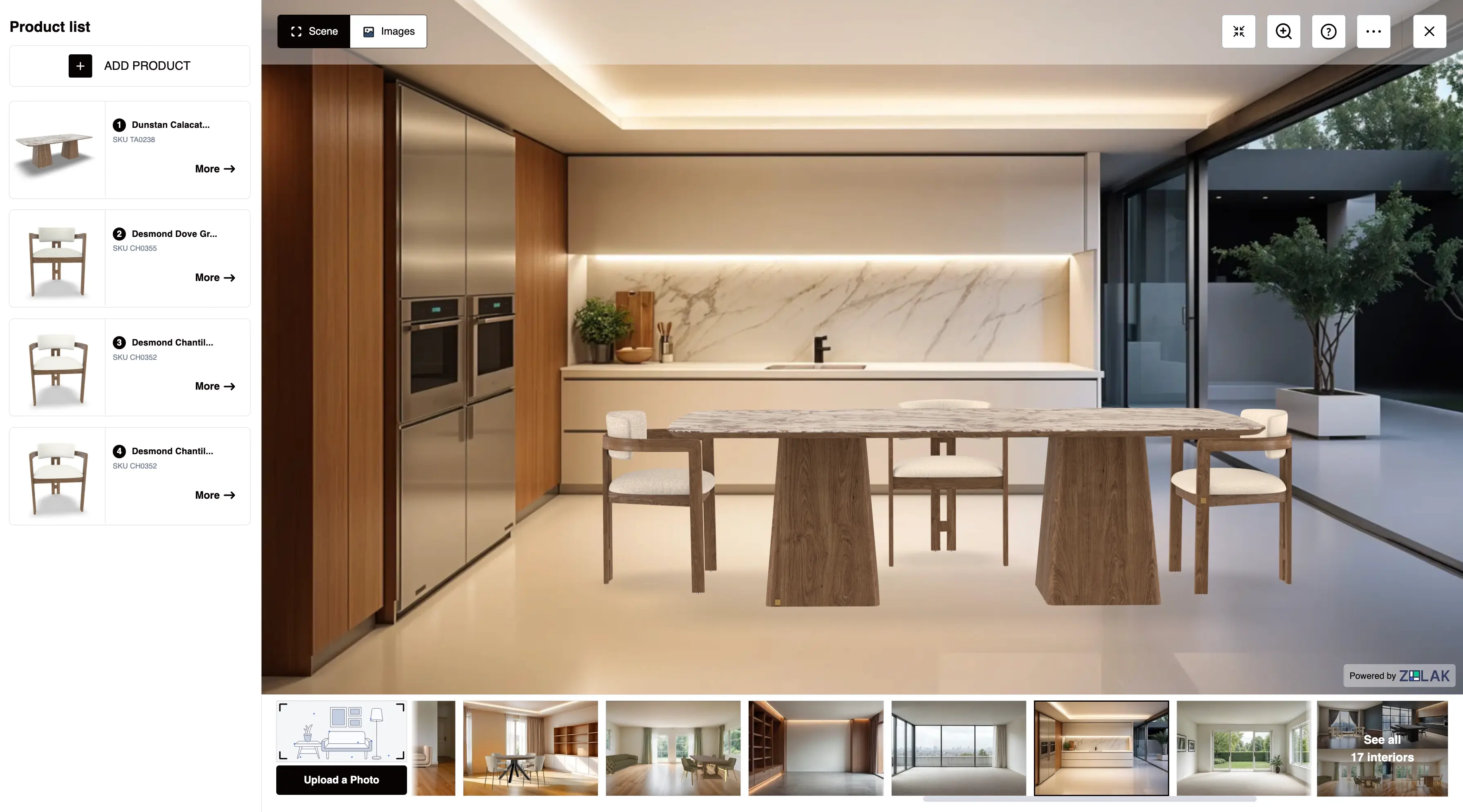
User Interior Visualization is an add-on to the Zolak Virtual Showroom that transforms a customer's room photo into an interactive shopping experience. Instead of imagining how furniture might fit, shoppers can rebuild their room using your real products, personalize every item, and see the complete result before purchasing.
Seamlessly Embedded into Your Website
Deploy User Interior Visualization as an inline widget or a pop-up without redirecting shoppers to another platform.
Choose Your Entry Points
Launch the experience from product pages, category pages, inspiration galleries, landing pages, banners, or any custom CTA.
Connected to Your Catalog
Every product in the room stays linked to your catalog, variants, materials, pricing, and checkout flow for a seamless buying experience.
How the Experience Works
A simple 5-step interactive journey that guides shoppers from an empty photo to a fully personalized interior and complete checkout.
Upload a Room Photo
Upload a smartphone photo of any room to create an editable space in seconds.
Remove Furniture
Clear the entire room or remove only selected objects to prepare the space for new products.
Add Catalog Products
Browse your catalog and place sofas, chairs, tables, rugs, and accessories into the scene.
Customize Items
Change materials, fabrics, colors, finishes, and sizes in real time directly inside the room.
Save & Purchase
Save the design layout, share it, or add all selected products straight into the cart.
Try the Interactive Demo
Explore every step of the customer journey and experience User Interior Visualization just as your shoppers would.

Real-time Customization Built-In 3D Product Configurator
Let shoppers personalize products without leaving the room. Every change updates instantly inside the scene, helping customers explore variations and make confident purchase decisions.
Sell Complete Rooms Instead of Individual Products
Inspire shoppers to buy entire sets by showcasing fully customizable room compositions across all major home categories.
Virtual Showroom Inspire First, Personalize Next
In addition to visualizing products inside their own homes, shoppers can explore your catalog in pre-designed digital interiors and outdoor environments to discover products and purchase with confidence.
Built for E-Commerce Sales, Not Just Floor Plans
Zolak vs. generic room planner tools
Generic Room Planner
Basic layout and planning tools
Designed for simple room planning without deep e-commerce integration or real product catalogs.
Zolak Interior Visualization
Full e-commerce room experience
Empower shoppers to customize, explore, and purchase full room sets directly from your real catalog.
Bring the IKEA Kreativ Experience to Your Brand
IKEA Kreativ raised the bar for furniture ecommerce by showing how customers can confidently shop after seeing products inside their own homes.
Enterprise-grade room visualization is no longer reserved for the world's largest retailers. Zolak democratizes this technology, allowing furniture brands of any size to power the experience with their own product catalog and embed it directly into their ecommerce website.
IKEA Kreativ
Your Brand with Zolak

See It Live: Koala Living Room Designer
Koala Living, an Australian furniture retailer with 23 galleries, runs its Room Designer on Zolak. Customers upload a photo of their own room, fill it with Koala furniture, and see how each piece fits their space before they buy. No photo at hand? They can start with one of the ready-made interiors.
We've particularly appreciated their willingness to help and the thoughtful recommendations they've brought to the table. The team has been approachable, responsive and proactive in sharing ideas, always taking the time to understand our needs and explore ways to support our goals.
FAQ
What is room furniture planner?
How can it improve our ecommerce performance?
What does implementation look like?
Next, we set up your product catalog in the Zolak CMS, where your 3D digital twins, materials, variants, and configuration rules become a centralized source of truth. Once your catalog is ready, we help to embed the visualization module into your website.
Beyond Room Planner, the same product catalog can also power additional Zolak modules, including the 3D Viewer, 3D Product Configurator, AI Studio for generating static product imagery, and 3D Rendering Studio for producing photorealistic marketing visuals.
Do we need 3D models?
How is the interactive module integrated into our website?
Can shoppers add products to the cart directly from the experience?
How long does implementation take?
Can we start with only part of our catalog?
Let Customers Design Their Own Home Using Your Products
Turn customer room photos into interactive shopping experiences with AI-powered room planning, true-to-scale product visualization, and built-in 3D product customization.