-1.svg)
Your Product Detail Page (PDP) is where the purchase decision happens. Not your ads, not your homepage, not your brand story. It’s where a shopper decides: “Do I buy this or not?”
But the way people make that decision has changed. Today’s shoppers don’t follow a linear journey. They:
-
Scan before they read
-
Evaluate visually within seconds
-
Compare options instantly
- Expect answers without effort
In this environment, the PDP has one job: remove uncertainty fast enough to keep the shopper moving toward purchase.
This guide breaks down what makes PDPs convert in 2026 and how modern visualization platforms like Zolak help brands deliver the clarity, confidence, and product understanding today’s shoppers expect at scale.
What is a Product Detail Page?
A Product Detail Page is the dedicated space where a shopper evaluates a single product in full: images, pricing, descriptions, specs, reviews, availability, shipping details, and ultimately decides whether to buy.
 Source: Amazon
It’s also where intent is at its highest. Around 45% of shoppers land on a PDP at the exact moment they’re ready to buy, making it one of the most critical touchpoints in the entire customer journey.
Yet many brands still treat PDPs like static templates instead of high-stakes conversion assets they are.
Rob Gonzalez, co-founder and CMO of Salsify, captured the common mistake perfectly:
“Millions of dollars are spent on the brand’s website, but only a small fraction on the PDP — but it should be the opposite.”
No matter how much traffic you drive or how strong your acquisition strategy is, the outcome is ultimately decided here. If your PDP doesn’t convert, the rest of the funnel doesn’t matter.
So, what does make a PDP convert in 2026?
Core Elements of an Engaging PDP
In 2026, the best PDPs are built around clarity, confidence, and reduced uncertainty.
1. Captivating Product Visuals
People don’t read first. They evaluate visually. Up to 93% of purchase decisions are influenced by visual appearance, meaning imagery often determines whether a shopper continues exploring at all.
Shoppers want instant clarity: what it looks like, how big it is, and how it fits into their lives. The clearer and more realistic the visual story, the lower the hesitation.
Best Practices:
- Use 5+ high-quality images showing the product from multiple angles.
- Include lifestyle shots to place the product in a real-world context.
- Add close-ups to highlight materials, textures, and details.
- Show the product in scale so users instantly understand size.
- Use human models where relevant (especially for apparel and accessories).
- Add short videos demonstrating real use and functionality.
Source: CB2
2. Immersive Content to Showcase Your Products
If strong visuals create clarity, immersive content builds confidence.
Static images no longer do enough on their own. A few angles and a lifestyle shot still leave open questions about size, materials, and how the product actually fits into a real space.
That’s why PDPs are shifting toward interactive experiences. Rotation, configuration, and in-context previews give a much clearer sense of the product before purchase — closer to how people evaluate it in-store.
Best Practices:
- Add 3D/360° product views: Let shoppers rotate, zoom, and inspect every angle.
-
Enable product customization: Make it easy to personalize products and explore the full range of colors, materials, and variations.
-
AR "View in Room": Use Augmented Reality to show how an item actually fits and looks in a real home.
-
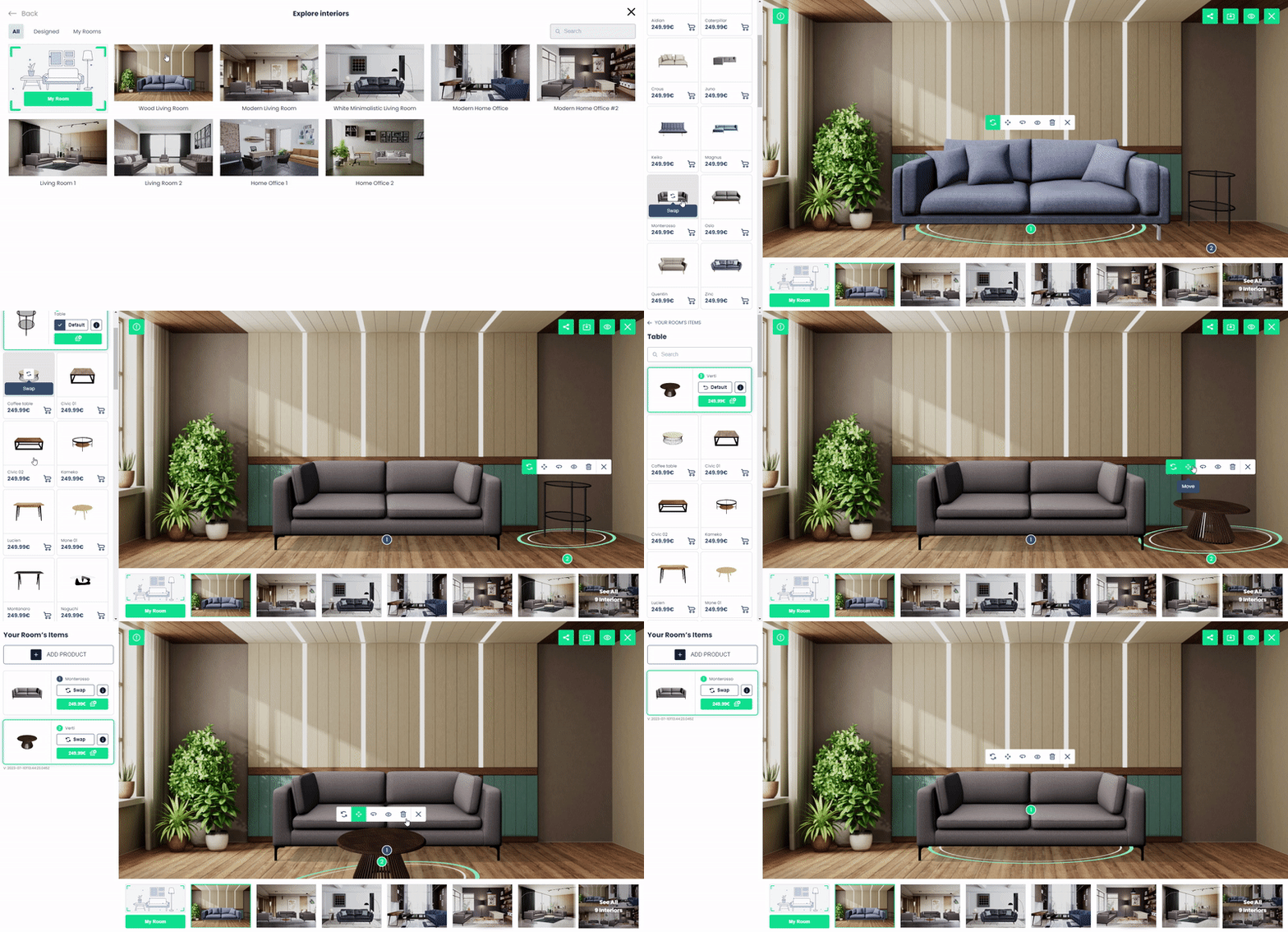
Offer intuitive space planners: Give customers an easy way to place multiple products together in styled interiors or their own rooms for a more personalized experience.
Source: IKEA
 Want the “IKEA Kreativ” experience for your own product catalog?
While tools like IKEA Kreativ are limited to their own catalog, Zolak is the only platform on the market that gives you this powerful technology for your products with zero limits.
You get two powerful experiences:
1. Virtual Showroom: Pre‑designed, fully rendered rooms where shoppers can explore your products. Ideal for inspiration, style exploration, and showing how pieces work together.
2. User Interior Visualization: Shoppers upload a photo of their own room, remove existing furniture, and rebuild the space using your products with accurate dimensions, real lighting, and true‑to‑life context.
3. Clear, Benefit-Driven Titles & Descriptions
By the time someone reads the title or description, they’re already interested. They're just checking whether the product fits their needs. Vague names and generic descriptions slow that decision down.
Clarity works better: what the product is, what makes it different, and why it’s the right choice — all visible within a few seconds.
Best Practices:
-
Write clear, descriptive product titles: Use a simple structure: Brand + Product Name + Key Attribute (material, color, size, or model).
-
Use keywords customers actually search for: For example, “Mid-Century Modern Velvet Sofa” instead of just “The Harrison”.
-
Focus on benefits: Instead of “Ergonomic foam,” say “All‑day comfort and back support.”
-
Keep descriptions concise and scannable: Short paragraphs, bullet points, and clear hierarchy.
-
Highlight key details upfront: Price, availability, delivery, and returns shouldn’t be hard to find.
-
Integrate FAQ‑style answers: Address concerns like sizing, fit, or compatibility before they become objections.

Source: Amazon
4. GEO-Friendly Content for Discovery & Ranking
Generative AI is becoming a new layer in product discovery. More shoppers are finding products through tools like ChatGPT, Perplexity, and Gemini, which surface recommendations based on intent, context, and relevance — not just keywords.
This shift has given rise to Generative Engine Optimization (GEO) — the practice of structuring product information so AI systems can easily understand, retrieve, and recommend your products.
As Felix Hoffmann, CEO of 7Learnings, notes:
“Consumers rely on more AI support to make their decisions. Retailers and brands need to do the same to stay successful.”
For product detail pages, this means going beyond traditional SEO. Your PDP should clearly communicate what the product is, who it is designed for, how it compares to alternatives, and which use cases it solves. The easier your content is for AI systems to interpret, the greater the chance your products appear in AI-generated recommendations and shopping answers.
Best Practices:
-
Structure content for AI readability: Use clear headings, consistent formatting, and predictable sections.
-
Tag products with real‑world scenarios: “Pet‑friendly,” “small‑space living,” “outdoor‑safe,” “kid‑proof,” etc.
- Create comparison-friendly content: Explain how the product differs from alternatives, models, materials, or configurations. AI assistants frequently surface products when answering comparison queries.
-
Use structured data: Add schema markup for product details, pricing, availability, and reviews so systems can read your page more easily.
-
Keep content consistent across channels: Make sure your product information matches everywhere — your website, marketplaces, and ads.
5. Transparent Pricing & Shipping
Even with great visuals and trust, friction often appears at checkout. Unexpected costs are the #1 reason for cart abandonment.
High-performing PDPs answer two questions immediately: "How much will this cost?" and "When will I get it?"
Best Practices:
-
Show the full price upfront: Show the total price, including discounts and estimated taxes, as early as possible.
-
Give clear delivery expectations: Use real-time data to show specific delivery dates (e.g., "Order in the next 3 hours for delivery by Thursday").
-
Make availability obvious: Use simple labels like “In stock”, or “Only 2 left”.
-
Don’t hide unavailable options: If a variant isn’t available, grey it out instead of removing it. It sets clear expectations and gives users a path to restock alerts.
-
Offer delivery choice: Give options like standard, express, or pickup so shoppers can decide what works for them.
-
Keep policies easy to find: Ensure your return and refund details are easy to find and written in plain language. Confidence in the return process is a major driver for first-time buyers.
 Source: Wayfair
6. Social Proof That Builds Trust
In a world of polished brand visuals and AI-generated content, shoppers look for something real.
They want to see how a product performs in everyday life: in real homes, with real people.
Products with at least five reviews are 270% more likely to be purchased than those with none. People trust other customers more than brands.
Best Practices:
-
Show ratings early: Place the average rating and review count near the product title to build trust immediately.
-
Highlight real customer photos and videos: Around 62% of shoppers are more likely to buy when they can see user-generated content. Add a UGC gallery to show the product in real homes, real use cases, and on different body types.
-
Make reviews easy to scan: Add filters like “with photos,” “most recent,” or “by use case” so shoppers can quickly find relevant feedback.
-
Use AI review summaries: Help shoppers save time with short summaries that highlight key pros and cons based on hundreds of reviews.
-
Show both positive and critical feedback: A balanced mix feels more authentic and increases credibility. Perfect ratings often feel less trustworthy than honest ones.
 Source: Amazon
7. Personalized Recommendations
PDPs are one of the best places to help shoppers discover alternatives or complementary items. When done well, recommendations feel less like upselling and more like helping shoppers find a better fit.
Personalization is what turns that from generic suggestions into relevant alternatives. It can drive up to 5.5x higher conversion rates and account for around 12% of total revenue.
Best Practices:
- Add “You may also like” alternatives: Show similar products in different styles, colors, or price points to keep users engaged if the current option isn’t the perfect fit.
- Personalize based on behavior: Use browsing history, location, and past purchases to surface more relevant and timely product suggestions.
- Show real value in each recommendation: Include key details like price, rating, and a quick action (e.g. View or Add to Cart).
- Place them where they help decision-making: Position recommendations after the main product details, or around reviews.
 Source: Westelm
8. Bundles to Increase Cross-Selling & AOV
Bundles work because they simplify decisions.
Instead of asking shoppers to figure out what pairs well together, you present combinations that already feel complete. When the pairing feels natural, buying more becomes the easiest next step.
Best Practices:
-
“Complete the look” bundles: If a shopper is looking at a sofa, show them the matching rug and coffee table.
-
“Frequently bought together” combinations: Group products that naturally complement each other to increase basket size in a logical way.
-
Create goal-based bundles: Frame combinations around use cases like “Complete Home Office Setup” or “Full Skincare Routine”. It helps shoppers think in terms of results.
-
Make the value clear: Bundles should feel like a smart deal. A clear 15–25% saving often creates that simple “might as well” moment.
-
One‑click add‑to‑cart option: Make it easy to add the entire bundle to cart in a single action.

Source: Quince
9. Speed and Mobile-First UX
Around 70% of ecommerce traffic comes from mobile. And chances are, your PDP is being viewed right now on a smartphone by someone on the move or in between tasks. They’re scrolling, comparing, and quickly deciding whether to stay or leave.
At that moment, speed is everything. If your page takes more than two seconds to load, you’re already losing customers.
Modern PDPs must be designed for thumbs, not desktops.
Best Practices:
-
Optimize loading speed: Keep pages lightweight by compressing images, using modern formats (like WebP), and minimizing heavy scripts.
-
Design mobile-first, not mobile-adapted: Build layouts for small screens from the start with clear hierarchy, spacing, and scannability as the priority.
-
Use sticky CTAs: As the user scrolls down to read reviews or specs, keep a "Buy Now" or "Add to Cart" button visible at the bottom of the screen.
-
Ensure fast image and media loading: Lazy-load visuals, but make sure key images appear instantly above the fold.
- Enable seamless mobile payments: Add one-tap checkout options like Apple Pay, Google Pay, or Shop Pay to remove friction at the final step.
Impact of Modern PDP Experiences
When these capabilities come together on a single PDP, the impact is measurable:
| Outcome | How It Drives Impact |
| Higher Conversion Rates | Immersive, interactive visuals reduce hesitation and can increase conversions by 30–40%. |
| Improved Confidence | 66% of shoppers report that 3D configurators boost their confidence in purchasing decisions. |
| Increased AOV | Bundles and contextual selling increase basket size by 20–55% |
| Fewer Returns | Better product understanding reduces returns by up to 20–40%, especially in high‑consideration categories. |
| Faster Content Production |
3D and AI‑powered workflows cut production time and costs by 70–90% compared to traditional photoshoots. |
| Risk‑Free Demand Testing |
Brands can validate demand for new variations before production, reducing overstock and improving inventory efficiency, with waste reductions of up to 15%. |
| Stronger Customer Loyalty |
Better product clarity increases satisfaction, making customers 60–70% more likely to return. |
| Clear Brand Differentiation | Advanced PDP experiences create a competitive edge, with 80%+ of shoppers saying experience matters as much as product, and 71% more likely to shop when AR is available. |
The Execution Gap: Why Brands Fail to Deliver
At this point, the path to a high-converting PDP is clear. Most teams already know how to handle the fundamentals: better copy, transparent pricing, strong social proof, personalization, and mobile-first UX.
But these are only the foundation.
The real differentiator in 2026 is the visual experience layer: the part that helps shoppers actually see, explore, and understand the product before they buy.
That is where many brands hit a wall. In practice, delivering this experience consistently across an entire catalog becomes difficult because:
-
Cost of quality: Traditional photoshoots for every variant, angle, and lifestyle scenario become too expensive.
-
Speed limitations: Content production can’t keep up with fast-changing assortments and inventory cycles.
-
Technical complexity: Building 3D viewers, AR, configurators, or virtual showrooms requires engineering resources most teams don’t have.
-
Lack of spatial understanding: 2D visuals fail to communicate scale, fit, and real-world context.
-
Consistency challenges: Maintaining quality across large catalogs becomes nearly impossible with manual workflows.
This is exactly the gap modern 3D visualization platforms are designed to solve.
Zolak Platform: All-in-One System for High-Converting PDPs
Zolak is built to cover the experience layer of the PDP — the part that turns a standard product page into an interactive, scalable, high-converting product experience.
Instead of relying on disconnected tools for interactive product visualization and static content creation, brands can manage the entire product experience within a single system.
This creates 100% visual consistency across the catalog and ensures that every PDP performs at the same standard regardless of scale.
1. One Visual Foundation: Digital Twins
Zolak helps brands move beyond static images using photorealistic 3D models that give shoppers a tactile, realistic understanding of your products.
-
Interactive 360° views that let shoppers inspect products from every angle.
-
Deep zoom interactivity for stitching, textures, and materials (the kind of detail usually only available in‑store).
-
Instant AR viewing (no app required) so customers can place life‑sized products directly in their space.
2. Real-Time Configuration
For products with multiple variations, Zolak enables real‑time customization directly on the PDP.
-
Instant option switching for colors, materials, and finishes.
-
Smart configuration logic that prevents invalid combinations.
-
Dynamic pricing updates that adjust in real time as shoppers customize.
Try Zolak 3D Product Cofigurator.
3. Contextual Visualization
Zolak removes the need for imagination by letting customers see products in context.
-
Immersive virtual showrooms to explore products inside fully rendered environments.
-
AI‑powered personalization that lets users upload photos of their own space.
-
Bundle visualization to show complete setups across categories.
- User‑friendly space planning that turns shoppers into designers directly on the PDP.
4. Scalable Content Production
Zolak Studio eliminates one of the biggest bottlenecks in ecommerce: content production.
-
Render Studio for photorealistic visuals using 3D models.
-
AI Studio for generating silo and lifestyle images from standard product photos.
-
Faster time‑to‑market by replacing expensive photoshoots and scaling content across all channels.
Try Zolak Studio.
Ready to Build PDPs That Actually Convert?
Start small: focus on your best-selling products, improve how they’re experienced, and measure the impact. Then scale what works.
Zolak’s modular platform is designed to grow with you. Whether you need a 3D viewer or a virtual showroom, you can implement the specific tools you need at your own pace.
Give your customers the clarity they expect. Book a demo and see what your PDPs could become!
.webp)